


macOS 27 rolled out this September, and festive sales across Bharat are putting new MacBooks on desks every day. New owners keep asking one question: How Do You Know If Your Mac Is Charging? We found the answer takes under ten seconds once you know where to look.
Important Things to Know
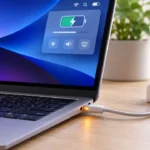
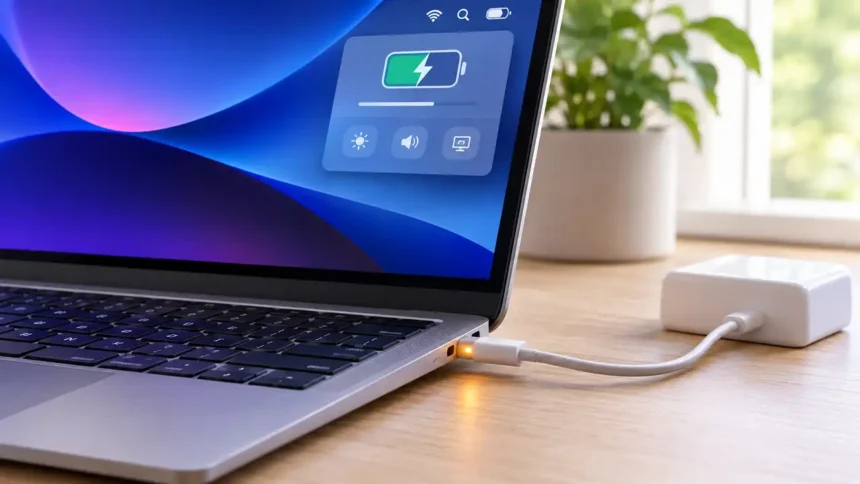
- A lightning bolt in the menu bar means your Mac is actively charging.
- A plug icon means power is connected, but Optimized Battery Charging has paused the charge.
- The MagSafe LED glows amber while charging and green when full.
What signals show your Mac is charging?
Your Mac shows charging status in four places. Each one answers a slightly different question.
| Indicator | Where to Look | What It Tells You |
|---|---|---|
| Lightning bolt icon | Menu bar, top right | Actively charging |
| Plug icon | Menu bar, top right | Connected, charge paused |
| MagSafe LED | Connector tip | Amber = charging, green = full |
| Battery settings | System Settings > Battery | Level history and battery health |
The Real Reason amazon macbook deals uk Is Trending Now
How do you check charging status step by step?
The menu bar is the fastest check. Follow these steps on any Apple silicon MacBook running macOS 27:
- Connect your USB-C or MagSafe cable to a working wall socket.
- Look at the battery icon in the menu bar for a lightning bolt.
- Click the icon to see Power Source: Power Adapter and the charge percentage.
- Hold Option and click the icon to view your battery condition.
- Open System Settings, then click Battery in the sidebar.
- Check the MagSafe LED if your model has one.
Apple details the battery panel in its official Mac battery condition guide.
What do the battery status messages mean?
Battery Health labels tell you whether slow charging is a hardware issue.
| Status | Meaning | Action |
|---|---|---|
| Normal | Battery works as expected | No action |
| Service Recommended | Holds less charge than new | Book an Apple Authorised Service Provider |
| Charging On Hold | Optimized Battery Charging paused at 80% | Normal behavior, wait or override |
| Not Charging | Power connected, no charge flowing | Check cable, adapter, and port |
Our analysis suggests “Charging On Hold” causes most false alarms among first-time Mac owners.
iPad Mini Case Is the Real 2026 Ecosystem Gamechanger
How do MacBooks charge in Bharat?
Charging method depends on your model and adapter.
| Model | Charging Port | Est. Starting Price (₹) |
|---|---|---|
| MacBook Air (M-series) | MagSafe 3 + USB-C | ~99,900 |
| MacBook Pro 14-inch | MagSafe 3 + USB-C | ~1,69,900 |
| MacBook Pro 16-inch | MagSafe 3 + USB-C | ~2,49,900 |
Prices are our estimates and shift with festive bank offers. Industry insiders are noting that buyers often pair a new Mac with a higher-wattage adapter during sales.
| Adapter | Best For | Approx. Price (₹) |
|---|---|---|
| 35W Dual USB-C | MacBook Air | ~5,800 |
| 70W USB-C | Air fast charging, Pro 14 | ~5,800 |
| 140W USB-C | Pro 16 fast charging | ~9,500 |
IPhone 17 Pro Case Designs Are Leaking Early
Why is your Mac not charging?
Most charging failures come from cables, ports, or settings.
| Problem | Likely Cause | Quick Fix |
|---|---|---|
| No icon change | Loose or damaged cable | Reseat or swap cable |
| Amber LED flashing | Power fault | Unplug for 10 seconds, reconnect |
| Slow charging | Low-wattage adapter | Use 70W or higher |
| Port not responding | Dust or moisture | Dry and inspect the port |
If you’ve been following the Apple ecosystem, this won’t come as a surprise. Our guides on how to clean charging port debris and handle water in charging port cases apply the same logic to Mac ports.
What does this mean for Apple users?
Correct charging habits protect battery lifespan and resale value. We also recommend checking for display faults while you inspect your new machine, as covered in our report on MacBook Pro screen issues.
Setting up a new Mac alongside your iPhone? Sync your chats first with our guide to iCloud Messages.
Latest post: Read Apple ecosystem in 2026 before you buy during festive sales.
For model-specific help, browse Apple Mac Help. Click your battery icon today and confirm you see the lightning bolt.
Visit consideringapple.com for more stories.