





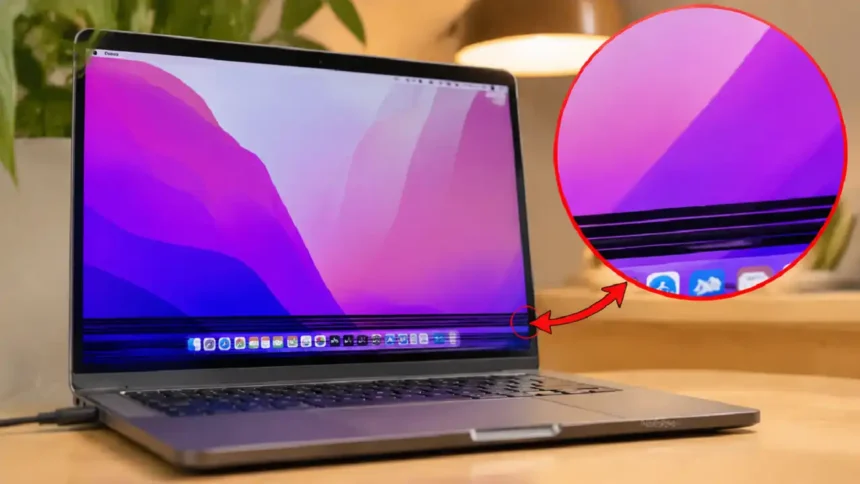
macOS 27 rolled out this September, and MacBook Pro owners across Bharat are posting about black lines at bottom of MacBook Pro screen displays. The timing matters: festive sales push people to repair or replace, and a wrong guess can cost you ₹50,000 or more.
Main Takeaways
- Black lines at the bottom usually point to a display cable or panel fault, not only software.
- A quick screenshot test tells you if the problem is hardware or macOS.
- Apple Authorised Service Providers in India quote far higher than third-party shops, so compare before you pay.
Why are black lines showing up now?
The fresh macOS 27 update is drawing attention to an older hardware fault. Our analysis suggests the update did not create most cases; it simply made owners restart, inspect, and notice the lines.
| Trigger | What We Found | Risk Level |
|---|---|---|
| macOS 27 update | Rare graphics glitches after install | Low |
| Worn display cable | Lines grow as you open the lid wider | High |
| Panel pressure damage | Lines stay fixed in one spot | High |
| Liquid or heat exposure | Common in monsoon humidity | Medium |
If you’ve been following the Apple ecosystem, this won’t come as a surprise. Our earlier breakdown of why your Mac screen has lines flagged the same cable wear pattern.
How To Make Shortcuts On Mac in macOS Monterey
Is it software or hardware?
A screenshot settles the question in under a minute. If the black lines appear in the saved image, macOS is drawing them; if not, the screen hardware is at fault.
| Test | Lines in Result? | Likely Cause |
|---|---|---|
| Screenshot | Yes | Software |
| Screenshot | No | Hardware |
| External monitor | No lines | Internal display |
| Apple Diagnostics | Error code | Logic board or cable |
Colour issues follow a similar logic, as we covered in our report on orange discoloration on MacBook Pro screens.
How do you fix black lines at home?
Start with the free checks before booking a paid repair.
- Take a screenshot with Shift + Command + 3 and inspect it.
- Restart your Mac and watch the boot screen for lines.
- Update macOS in System Settings > General > Software Update.
- Boot into Safe Mode to rule out third-party apps.
- Connect an external display through HDMI or USB-C.
- Tilt the lid slowly and note if lines change with the angle.
- Run Apple Diagnostics: hold the power button on Apple silicon, then press Command + D.
- Book a repair if lines remain on the internal screen only.
Slow startups can mask display faults, so pair this with our guide on fixing a slow boot Mac.
How to Remove Password from PDF On Mас
What does repair cost in India?
Out-of-warranty screen work is the biggest expense most owners face.
| Repair Option | Estimated Cost (₹) | Turnaround |
|---|---|---|
| Apple Authorised Service | 50,000 to 75,000 | 5 to 10 days |
| Third-party repair shop | 15,000 to 40,000 | 2 to 5 days |
| Display cable only | 6,000 to 15,000 | 1 to 3 days |
| AppleCare+ covered | Service fee only | 5 to 7 days |
These are market estimates from metro cities like Delhi, Mumbai, and Bengaluru.
Confirm official pricing on Apple’s Mac laptop repair page.
Should you repair it yourself?
DIY repair saves money, but one torn cable can destroy the panel.
| Pros | Cons |
|---|---|
| Lower cost | Voids warranty |
| Faster turnaround | Needs special tools |
| Repair guides available | High risk on Apple silicon models |
Check difficulty ratings on iFixit’s MacBook Pro repair hub before you open anything.
What does this mean for Apple users?
Owners should act early.
Industry insiders are noting that cable faults spread, and a small line often becomes a dead display within weeks. Small display quirks also show up in software, like the issue in our pink pointer colour fix for MacBook Neo.
Latest post: Read Why MacRumors Is Changing Apple Ecosystem in 2026 before you spend during festive sales. Run the screenshot test today, then compare two repair quotes before you pay.
Visit consideringapple.com for more stories.