



How to Book an Apple Genius Bar Appointment (And Actually Get the Slot You Want)
→ How to Change the Apple Maps Voice (And Make It Sound the Way You Want)
Your MacBook won’t turn on. Your iPhone screen is cracked and the touch is going haywire. You open Apple’s website to book a repair, and suddenly you’re three menus deep with no clear path to a calendar. It happens to almost everyone the first time, and plenty of people the second time too.
→ How to Change Your Apple ID Country or Region (Without Losing Your Stuff)
Booking a Genius Bar appointment is genuinely quick once you know where to go and what to expect. This guide walks you through the full process, covers the mistakes that slow people down, and gives you a few practical tips to actually land a time that works.
The Fastest Way to Book
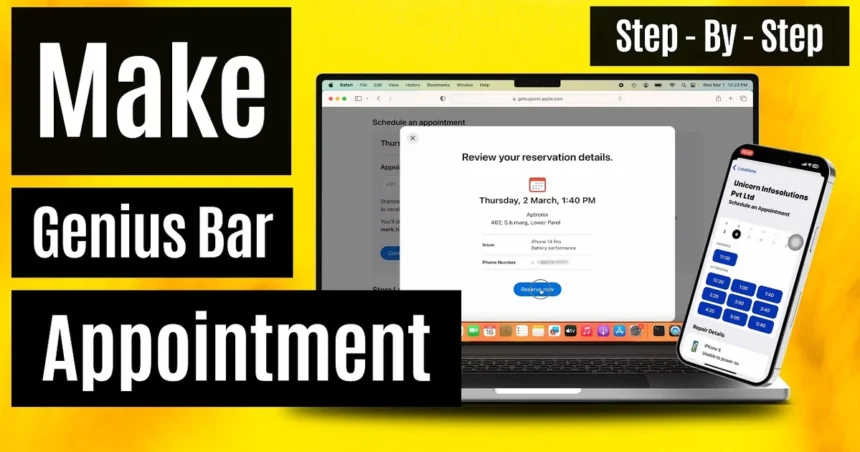
Skip the main Apple website entirely. The two quickest paths are the Apple Support app (free on the App Store) and getsupport.apple.com. Both take you directly to the booking flow without the extra clicks.
Here’s what the process looks like from start to finish:
1. Open the Apple Support app or go to getsupport.apple.com
2. Select the device you need help with
3. Describe the issue, either by choosing from the listed categories or typing it out
4. Choose “Bring in for Repair” when asked how you’d like help
5. Pick a nearby Apple Store, then choose an available date and time
6. Confirm your appointment and check your email for the confirmation
The whole thing takes under two minutes if your Apple ID is already signed in. Appointments are free to book, and you only pay if a repair is needed and you agree to the cost.
Why You Shouldn’t Just Walk In
Apple Stores moved away from a first-come, first-served model years ago. Walk-in slots do exist, but they depend entirely on same-day cancellations. At busy locations in cities like New York, Los Angeles, or Chicago, the day’s appointments can fill up by 9 a.m. Showing up without a booking often means waiting hours or being turned away entirely.
Booking ahead is always the better move, even if your issue feels urgent.
When New Slots Appear
This is the tip most people don’t know: most Apple Stores release new appointment slots every morning around 7 a.m. local time. If you’re checking a store and nothing is available, don’t give up. Check back the next morning early, and you’ll often find fresh availability that wasn’t there the night before.
Stores also release slots when people cancel, so checking a couple of times throughout the day can pay off if you need something sooner.
What to Do Before You Arrive
Once you have your appointment, a little prep goes a long way toward making the visit faster and smoother.
- – Back up your device. If your iPhone or Mac needs a repair that involves replacing hardware, your data could be wiped. Back up to iCloud or your computer before you go.
- – Know your Apple ID password. Technicians often need to verify the device isn’t activation-locked, and being locked out of your own account can delay everything.
- – Note when the issue started and what triggers it. The more specific you can be, the faster the technician can diagnose the problem.
- – Remove your case. It sounds minor, but it saves time during the physical inspection.
What’s Changing at the Genius Bar
Something worth knowing if you have an upcoming appointment: Apple is currently testing an AI-powered feature called Live Notes at select stores. The system uses AI to transcribe conversations between customers and Genius Bar employees during appointments, creating an automatic record of what was discussed.
The goal is to let technicians focus on the customer rather than stopping to type notes throughout the session. Once an appointment wraps up, the transcript is added to the employee’s iPad as part of the repair record.
The feature is opt-in for both the customer and the employee, so you won’t be recorded without agreeing to it first. Employees can also edit the transcript after the fact. The program is still in a pilot phase, and not every store is running it yet.
Some employees have raised concerns about how transcripts could be used beyond the repair context, including whether they might factor into performance reviews. Apple hasn’t made any public statement about the program’s broader rollout.
If You Need to Cancel or Reschedule
Life moves fast. If you need to change your appointment, go back to the Apple Support app or getsupport.apple.com, sign in, and manage your upcoming appointments from there. Canceling at least a few hours ahead is considerate and frees the slot for someone else who needs it.
Booking a Genius Bar appointment is one of those things that feels harder than it is. Once you know the right starting point and what to expect, it’s a straightforward process. The key is booking early, checking back at 7 a.m. if slots look full, and showing up prepared.
Relevant posts
- iPhone XS Max IMEI Number: How to Find It, Check It, and Why It Matters
- White Dot on Your iPhone Screen? Here’s What It Actually Means and How to Fix It
- Fix iPhone Not Connecting to Wi-Fi
Visit consideringapple.com for more stories.






![How To Retrieve Or See Deleted Messages On iPhone [100% Working]](https://consideringapple.com/wp-content/uploads/2026/03/How-To-Retrieve-Or-See-Deleted-Messages-On-iPhone-100-Working-420x280.webp)