



Apple Watch Watchos 27 Updates: watchOS 27: Every New Feature Coming to Apple Watch This Year
→ iPhone 16 Pro Max Price Drop: What It Actually Costs Now and Whether It’s Worth Buying
Apple’s annual developer conference brought a wave of announcements, and Apple Watch owners have plenty to look forward to. watchOS 27, unveiled at WWDC 2026, is already in the hands of developers and public beta testers, with a full public release expected in September. Here’s a breakdown of what’s new, what’s changed, and whether your watch will actually support it.
The biggest shift is how Siri works
The headline feature of watchOS 27 is Siri AI, a completely rebuilt version of Apple’s voice assistant powered by generative AI. This is not a minor upgrade. The new Siri behaves much more like ChatGPT or Claude than the Siri Apple Watch owners have used for years. It can hold genuine back-and-forth conversations, remember context within a session, and handle complex, multi-step requests rather than just answering isolated questions.
→ Fix iPhone Not Connecting to Wi-Fi
What makes this particularly useful on the wrist is the personal data access. Siri AI can search across Mail, Messages, Notes, Reminders, Calendar, and other apps on your iPhone, then relay relevant information directly to your watch. So if you ask Siri on your watch to find a dinner reservation you made last month, or remind you what a colleague said in a recent message, it can actually do it. That kind of contextual awareness was never possible with the old Siri.
Processing for Siri AI is not done on the Apple Watch itself. The watch acts as an interface, with the heavy lifting handled elsewhere, which is worth knowing if you’re somewhere with a poor connection.
A dedicated Siri app changes how you interact with it
watchOS 27 introduces a standalone Siri app on Apple Watch, giving you a single place to view all of your Siri conversations, including ones you started on your iPhone. This makes it easier to pick up where you left off or review what was discussed without hunting through your phone.
The app also signals a broader shift in how Apple wants users to think about Siri. Rather than a quick-query tool you summon and forget, Siri AI is being positioned as an ongoing assistant you can return to, check in with, and use across devices without losing the thread.
Which Apple Watch models are supported
Not every Apple Watch will get watchOS 27. Only six models make the cut:
| Supported Model | Notes |
|---|---|
| Apple Watch Series 9 | Oldest supported Series model |
| Apple Watch Series 10 | Supported |
| Apple Watch Series 11 | Supported |
| Apple Watch Ultra 2 | Supported |
| Apple Watch Ultra 3 | Supported |
| Apple Watch SE 3 | Only supported SE model |
If you’re on a Series 8 or earlier, or an older SE or Ultra model, watchOS 27 will not be available. This is a meaningful cut, and it reflects Apple’s growing reliance on newer chip architectures to run Apple Intelligence features, even when some processing happens off-device.
What this means for everyday Apple Watch use
For most people, the practical value of watchOS 27 comes down to one thing: whether Siri AI actually delivers on its promise. Apple has tried to make Siri smarter before, and the results have been mixed. The difference this time is the underlying model. By building on generative AI rather than the older rule-based approach, Apple is starting from a fundamentally different foundation.
Whether that translates to a better experience on a small wrist display, where you can’t type and you’re often in motion, will depend on how well Apple has optimized the conversational flow for the watch’s constraints. The dedicated Siri app is a smart addition here. It acknowledges that a quick voice query doesn’t always have to end the moment you lower your wrist.
When to expect it and how to get it now
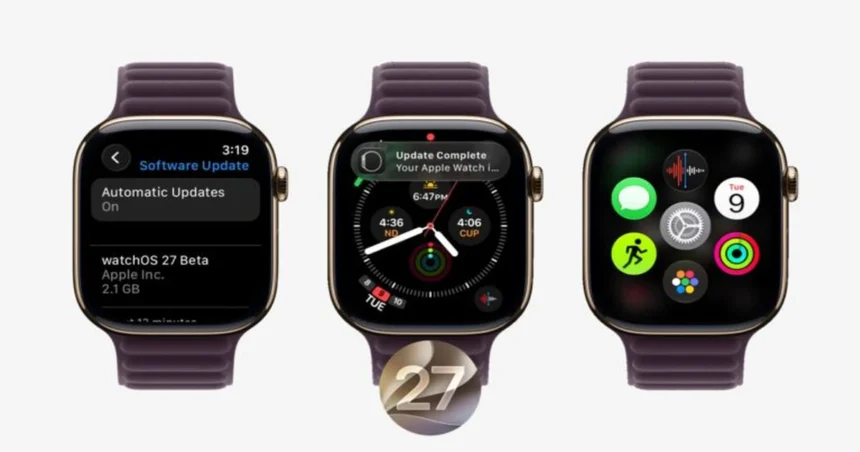
watchOS 27 is expected to release publicly in September 2026, in line with Apple’s usual fall software rollout. If you want to try it before then, developer and public beta access is already open. Public betas are generally stable enough for daily use, though it’s worth keeping a backup before installing any pre-release software on a device you rely on.
When the update does arrive, it will be available through the Watch app on your iPhone, under General and then Software Update. Your iPhone will need to be running iOS 27 to support the watchOS 27 installation.
Relevant posts
- How to Use Sora AI for Free on iOS
- How to Fix WhatsApp Notifications Not Working on iPhone
- What is Assistive Access in iOS 17 and How to Enable It?
Visit consideringapple.com for more stories.