


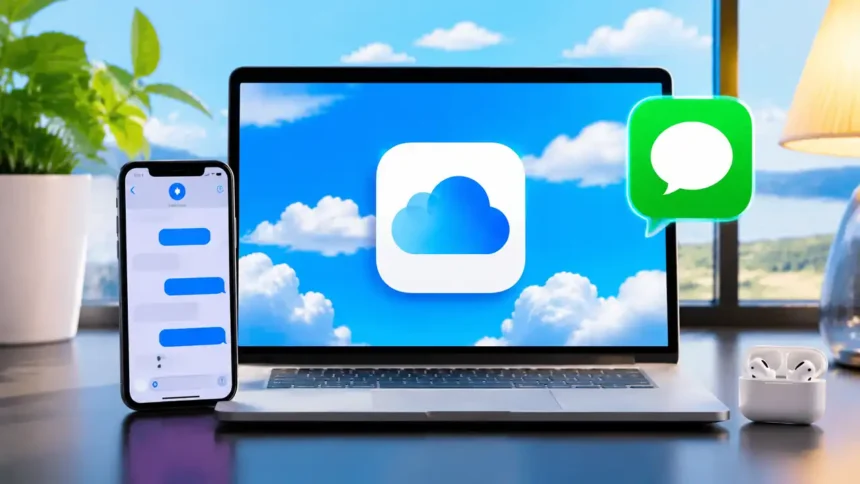
Millions of new iPhone owners are setting up devices this September, and their first question is about old chats. How to Access Messages on iCloud decides whether your texts follow you or vanish during an upgrade. One toggle makes the difference.
Key Takeaways
- Messages in iCloud syncs your texts across iPhone, iPad, and Mac signed in to the same Apple Account.
- You cannot read messages on iCloud.com through a browser. Access happens only on Apple devices.
- The free 5GB tier fills fast, so most heavy texters in India need an iCloud+ plan.
What is Messages in iCloud?
Messages in iCloud is a sync feature, not a web inbox. It stores your iMessage and SMS history in iCloud and mirrors it on every Apple device you own. Our analysis suggests this is the most misunderstood iCloud feature.
Users expect a browser login, and Apple does not offer one.
| Feature | Messages in iCloud | iCloud Backup |
|---|---|---|
| Real-time sync | Yes | No |
| Works across devices | Yes | Restore only |
| Deletes sync everywhere | Yes | No |
| Viewable on iCloud.com | No | No |
Aesthetic Pink Messages Icon For iPhone in iOS 14
How do you turn on Messages in iCloud?
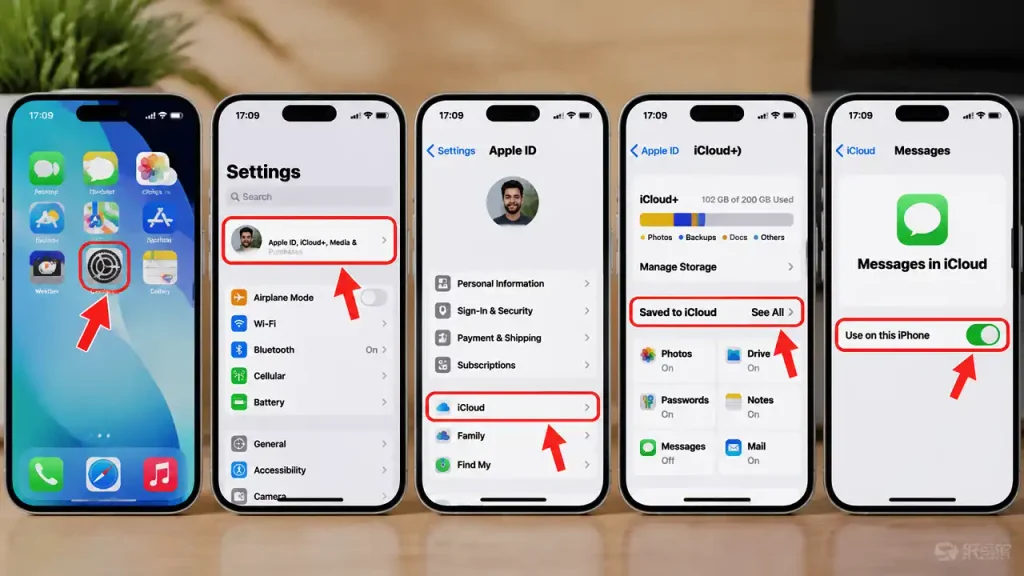
You turn it on from the Settings app on each device.
Follow these steps on your iPhone or iPad:
- Open the Settings app.
- Tap your name at the top.
- Select iCloud.
- Tap “See All” under Saved to iCloud.
- Choose Messages in iCloud.
- Switch on “Use on this iPhone.”
On a Mac, follow these steps:
- Open the Messages app.
- Click Messages, then Settings.
- Select the iMessage tab.
- Check “Enable Messages in iCloud.”
- Click “Sync Now” to force an update.
Apple lists the full requirements on its official Messages in iCloud support page. If your camera or browser tools also need setup, our guide on how to enable webcam on Safari iOS covers that process.
Which devices support it?
Messages in iCloud works on most Apple hardware sold in the last several years. We found compatibility is rarely the problem. Storage is.
| Device | Minimum Software | Supported |
|---|---|---|
| iPhone | iOS 11.4 | Yes |
| iPad | iPadOS / iOS 11.4 | Yes |
| Mac | macOS High Sierra 10.13.5 | Yes |
| Apple Watch | Syncs via paired iPhone | Partial |
| Windows PC / Browser | None | No |
Browse our latest iPhone coverage and iPadOS updates for device-specific tips.
How much does iCloud storage cost in India?
iCloud+ pricing in India is among the lowest of Apple’s major markets. Industry insiders are noting this keeps adoption climbing among Indian iPhone users.
| Plan | India Price (Monthly) | US Price (Monthly) | Best For |
|---|---|---|---|
| Free | ₹0 | $0 | Light users |
| 50GB | ₹75 | $0.99 | Texts and photos |
| 200GB | ₹219 | $2.99 | Families |
| 2TB | ₹749 | $9.99 | Heavy media |
| 6TB | ₹2,900 | $29.99 | Creators |
| 12TB | ₹5,900 | $59.99 | Power users |
Check current rates on Apple’s India iCloud page, since regional pricing can shift.
Messages Icon Aesthetic For iPhone iOS 14 or iOS 15
Why does this matter for Bharat?
If you’ve been following the Apple ecosystem, this won’t come as a surprise. India has become one of Apple’s fastest-growing markets.
| Bharat Indicator | Status (September 2026) |
|---|---|
| Apple retail stores | Mumbai, Delhi, Bengaluru, Pune, Noida |
| Local iPhone production | Major share of global output |
| iCloud+ billing | UPI, cards, and net banking supported |
| Most common upgrade path | Android to iPhone switchers |
| Key iCloud need | Message and photo transfer |
Android switchers lose WhatsApp-style habits but gain synced iMessage history. That makes Messages in iCloud a day-one setting for new Indian buyers.
What are the trade-offs?
Our team observed clear benefits and a few limits.
- Pro: Frees local iPhone storage
- Pro: End-to-end encryption with Advanced Data Protection
- Pro: Faster setup on new devices
- Con: Deletions remove messages everywhere
- Con: No browser or Windows access
- Con: Free 5GB fills quickly
How To Use “Announce Messages With Siri” on AirPods in iOS 14
What should you do next?
Turn on Messages in iCloud before you trade in or reset your old iPhone. Then confirm your storage in Settings and upgrade to a 50GB plan if usage tops 80%.
For more practical walkthroughs, visit our latest iOS guides on Considering Apple.