



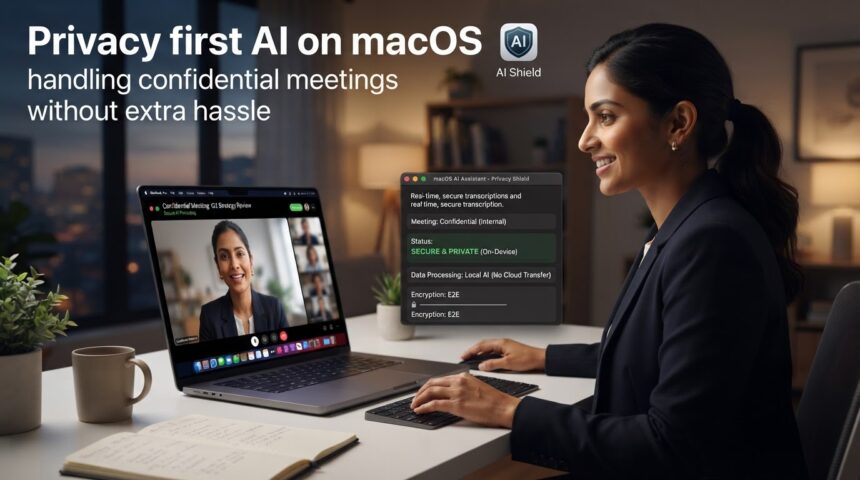
For many professionals and business owners, meetings are the place where an organization’s most important and delicate decisions are made. There, discussions take place regarding intellectual property, financial negotiations, and even interviews with potential clients, which is why the information flowing through calls on macOS is of incalculable value. But the pressing need to take notes quickly has pushed many to adopt artificial intelligence voice processing solutions without considering the potential security implications this entails.
- The invisible risks of AI transcription on macOS
- Opaque management of microphone permissions
- File dispersion and uncontrolled synchronization
- Unmonitored automatic backups
- Indefinite retention periods
- Practical guide to achieving a confidential workflow
- Technology and privacy in modern tools
- Frequently asked questions related to privacy and transcription on macOS
Hence, it is essential to understand how a privacy aware transcription model interacts with the microphones on a MacBook, where the data travels, and how to establish some effective protection barriers without adding operational hurdles to the procedure.
The invisible risks of AI transcription on macOS
It is no secret to anyone that the Mac environment is characterized by its rigorous privacy policies; however, the installation of third-party tools can open unwanted gaps if they are not properly configured. Therefore, when managing confidential meetings, every professional must audit four critical risk areas:
Opaque management of microphone permissions
In macOS, access to the physical microphone is always protected at the system level. But when we grant permissions to recording applications or extensions without reviewing their policies, we allow the software to capture any sound signal without there necessarily being a clear visual indicator for the user or the interlocutors.
File dispersion and uncontrolled synchronization
Now, the greatest danger when working with sensitive audio is the dispersion of data. Because a single call can generate a compressed audio file in the Downloads folder, a backup copy in iCloud Drive, a temporary file in the browser’s cache, and a text document saved in a shared storage service. And the more locations a transcription occupies, the greater the attack surface against unauthorized access.
Unmonitored automatic backups
Generally, integrated backup services like Time Machine or automatic cloud synchronization systems execute continuous backups. But while this feature saves accidentally deleted files, it also perpetuates the existence of confidential recordings that internal company policy required to be destroyed after the meeting ended.
Indefinite retention periods
Saving voice records and full texts indefinitely is an administrative vulnerability. Keep in mind that raw audio contains not only confidential information, but also vocal biometrics data, emotional tones, and proper names that should not be stored longer than strictly necessary to extract agreement points.
Practical guide to achieving a confidential workflow
Fortunately, guaranteeing the confidentiality of your calls on Mac does not require advanced computer engineering knowledge; it only takes discipline and good configuration practices:
- Periodically audit the Privacy section: go to System Settings > Privacy & Security > Microphone and disable access to any application you do not use daily. Perform the same check in the System Screen and Audio Recording section.
- Notify and formalize consent: before starting any sensitive call, formally inform all participants. A notice in the meeting invitation or a brief verbal mention when starting the call can save you legal and ethical conflicts.
- Process and centralize in closed environments: avoid exporting transcripts to public folders or unencrypted notepads. Always keep the text and summary in a single controlled platform.
- Apply definitive deletions: once a meeting’s agreements and key tasks have been extracted, delete the original audio recording to reduce the exposure of biometric data.
Technology and privacy in modern tools
However, for privacy aware transcription to be sustainable over time, the tools used must, above all, simplify management instead of adding complications. Because, after all, what people need is to be able to convert audio into text without having to sacrifice data control.
This is possible thanks to platforms designed to optimize productivity like SummaryAI, which allows you to automate note-taking on macOS while always respecting professional work environments. With it, you can perform word-for-word transcriptions of meetings, interviews, or seminars, generating automatic summaries with key points and identifying the different speakers. In addition, by including query assistants on the content itself, it facilitates the search for information within the text without the need to export it to other external documents.
As if that were not enough, it is available for both desktop and mobile devices, which helps maintain an organized ecosystem where the user knows exactly where their information is processed, thus eliminating manual note-taking both in the office and while on the move.
Frequently asked questions related to privacy and transcription on macOS
How can Mac users verify if an AI transcription workflow is appropriate for confidential meetings?
To check if a process is secure before implementing it in sensitive calls, it is advisable to evaluate five key aspects:
- Data location: verify if the recording is stored locally or on servers with end-to-end encryption.
- Access control: confirm which users or administrators within the organization have permissions to read the transcript.
- Deletion mechanisms: check if deleting a file permanently clears the text and audio from the servers.
- Automatic backup: ensure that the software does not generate duplicates in secondary clouds without the user’s explicit consent.
- Regulatory compliance: contrast the tool with the company’s internal compliance policies and applicable data protection regulations.
What is the simplest way to manage consent when recording meetings on macOS?
Although legal requirements vary by state or country, the general rule is absolute transparency. In fact, the simplest way to manage consent is to include a clarifying phrase in the calendar call itself (for example: “This session will be recorded and summarized for the internal work minutes”). Also, at the start of the session, it must be verbally confirmed that all attendees agree. When using, for example, solutions like SummaryAI to transcribe the encounter, workflows improve substantially if all participants understand what will be recorded, for what purpose, and who will have access to the final summaries.
How should professionals manage backups of sensitive transcripts on a MacBook?
Since automatic backups are useful but can be very dangerous, the recommended approach is to handle them responsibly:
- Avoid saving duplicates of the same transcript in generic shared cloud folders.
- Configure folders excluded from automatic Time Machine backups if they contain temporary audios with highly confidential information.
- Delete raw audio files once the text summary has been validated, retaining only the processed information that is strictly necessary for project tracking.
Because learning to manage confidential meetings on macOS with the backing of artificial intelligence is not a matter of giving up innovation, but of adopting tools and habits respectful of information. This will allow you to save a huge amount of time on every call without compromising your organization’s security.