



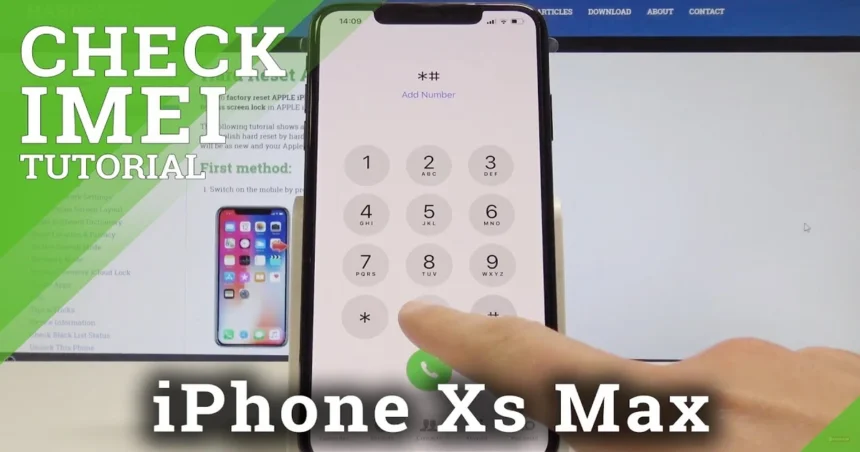
Iphone Xs Max Imei Number: iPhone XS Max IMEI Number: How to Find It, Check It, and Why It Matters
→ White Dot on Your iPhone Screen? Here’s What It Actually Means and How to Fix It
Every iPhone XS Max carries a unique identifier that most owners never think about until they genuinely need it. That number is the IMEI, and knowing where to find it and what to do with it can save you from a costly mistake, whether you’re buying a used device, reporting a lost phone, or trying to unlock it for a different carrier.
→ Fix iPhone Not Connecting to Wi-Fi
Here’s everything you need to know.
What the IMEI number actually is
IMEI stands for International Mobile Equipment Identity. It’s a 15-digit number that is permanently assigned to your iPhone XS Max at the factory. No two devices share the same IMEI, which makes it one of the most reliable ways to identify a specific phone.
Carriers, manufacturers, and law enforcement agencies all use IMEI numbers to track, block, or verify devices. If your phone is reported stolen, the IMEI is what gets flagged on national and international databases, making the device harder to use on any legitimate network.
How to find the IMEI number on your iPhone XS Max
There are several ways to locate it, and you don’t need any special tools.
Through the Settings app
This is the easiest method if your phone is still working and accessible.
- – Open Settings
- – Tap General
- – Tap About
- – Scroll down until you see IMEI
You can tap and hold the number to copy it directly to your clipboard.
On the physical SIM tray
Apple engraves the IMEI on the SIM card tray of the iPhone XS Max. Eject the tray using a SIM ejector tool or a straightened paperclip, and you’ll find the number printed on the tray itself. The text is small, so good lighting helps.
On the original box
If you still have the retail packaging, the IMEI is printed on the barcode label on the side or back of the box. This is especially useful if the phone is locked or damaged and you can’t access the Settings app.
Through iTunes or Finder
Connect your iPhone XS Max to a computer, open iTunes (on Windows or older macOS) or Finder (on macOS Catalina and later), and click on your device. Select Summary and click on the phone number field until the IMEI appears.
Via a phone call
Dial **\*#06# on your iPhone. The IMEI will appear on screen immediately without needing to navigate any menus.
Why you should check the IMEI before buying a used iPhone XS Max
Buying a second-hand iPhone XS Max is a smart way to save money, but it carries real risk if you skip the IMEI check. A phone that looks perfectly fine in photos could be blacklisted, carrier-locked, or still linked to someone else’s Apple ID.
Before handing over any money, ask the seller for the IMEI number and run it through a reputable checker. Several services let you do this for free or a small fee, including:
- – Apple’s official coverage checker at checkcoverage.apple.com, which tells you whether the device is still under warranty and whether Activation Lock is on
- – IMEI.info, which provides carrier lock status, blacklist status, and model details
- – Swappa’s free IMEI checker**, which cross-references multiple databases
What you’re looking for is confirmation that the phone is not blacklisted, not reported stolen, not still locked to a carrier you can’t use, and not tied to an active Activation Lock. If any of those flags come back, walk away.
What a blacklisted IMEI means for you
When a phone is reported lost or stolen, the owner’s carrier adds its IMEI to a shared blacklist. In the United States, this database is managed by the GSMA and shared across major carriers. A blacklisted iPhone XS Max will typically be blocked from making calls, sending texts, or connecting to mobile data on any domestic network.
Some sellers are unaware their device is blacklisted, but others know exactly what they’re selling. Either way, a blacklisted phone is extremely difficult to use as a daily driver, and in most cases it’s not worth buying at any price.
Carrier unlocking and the IMEI
If your iPhone XS Max is locked to a specific carrier and you want to use it with a different SIM, your IMEI number is central to the unlocking process. Most legitimate carrier unlocks are done by submitting your IMEI to the carrier directly. AT&T, T-Mobile, and Verizon all have official unlock request portals where you enter your IMEI and account details.
Apple also processes unlocks through carriers rather than directly, so the IMEI is always the key piece of information in the request. Once a carrier approves the unlock, the change is applied remotely and your phone will accept any compatible SIM.
Third-party unlocking services also use the IMEI to process requests, though the reliability of these services varies significantly. Stick to well-reviewed providers and avoid any service that promises to remove an iCloud or Activation Lock using only an IMEI, because that is not how Activation Lock works, and those services are almost always scams.
Keep your IMEI somewhere safe
Write down your iPhone XS Max’s IMEI and store it somewhere separate from the phone itself. If the device is ever lost or stolen, you’ll need it to file a police report, contact your carrier to block the device, and make an insurance claim. Having it ready saves time when every minute counts.
It takes about 30 seconds to find and save. There’s no good reason to skip it.
Relevant posts
- How to Fix WhatsApp Notifications Not Working on iPhone
- iPhone Journaling Discoverable : What Is It and How to Disable It?
- How to Clean iPhone Charging Port Without a Toothpick
Visit consideringapple.com for more stories.