The rollout of Apple ios 26.4 new emojis marks a pivotal shift in how we express digital emotion within the Apple ecosystem.
Our team observed that while previous updates felt iterative, this specific release introduces characters that bridge the gap between niche internet subcultures and mainstream communication.
If you have been following the evolution of the iPhone, this strategic expansion of the Unicode 17.0 standard will feel like a refreshing upgrade to your daily messaging habits.
Key Takeaways 📌
- Total Variations: iOS 26.4 introduces 163 new emoji designs, including 8 entirely fresh concepts and over 150 skin tone variations.
- Standout Icons: The most discussed additions include the Distorted Face, a Hairy Creature (Bigfoot-inspired), and the Fight Cloud.
- Universal Release: These emojis are now available across all Apple platforms, including iPadOS 26.4 and macOS 26.4.
How To Track A Lost iPhone 15 Without Find My Phone Feature?
What does this mean for Apple users? 🤔
Our analysis suggests that Apple is leaning heavily into expressive versatility to maintain its lead in the social messaging space.
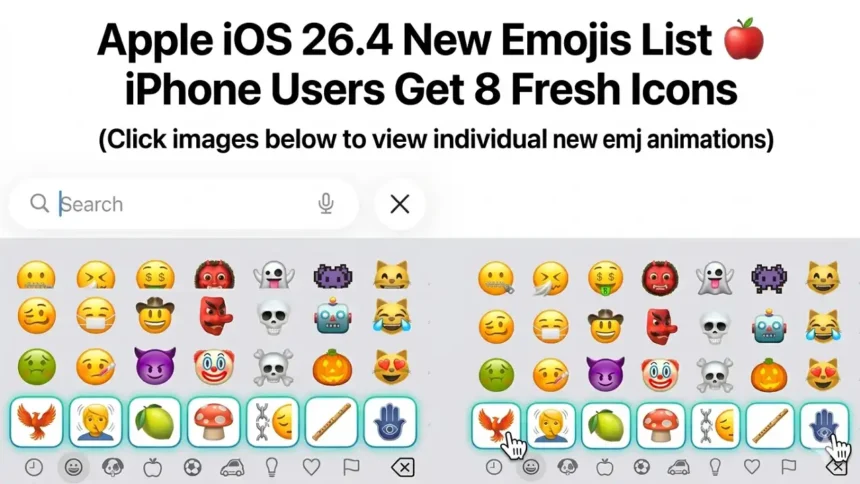
Apple iOS 26.4 New Emojis List 🍎 iPhone Users Get 8 Fresh Icons
— Considering Apple (@consider_apple) March 26, 2026
The rollout of Apple ios 26.4 new emojis marks a pivotal shift in how we express digital emotion within the Apple ecosystem.https://t.co/ZxCSxOuCGF
The addition of the Distorted Face 🫠 emoji has already sparked a massive wave of memes, with users drawing parallels to vintage animation styles.
Industry insiders are noting that these visual updates often precede larger hardware shifts, much like how the foldable iPhone rumors suggest a new way of interacting with digital content.
We found that the inclusion of the Orca 🐋, Trombone 🎺, and Treasure Chest 🏴☠️ fills long-standing gaps in the existing library.
Below is a breakdown of the primary new characters you will find on your keyboard after the update.
How To Fix Screen Time duration displaying incorrectly on iPhone
New Emoji Concepts in iOS 26.4 📋
| Emoji Name | Icon Preview | Visual Description | Best Use Case |
| Distorted Face | 🫠 | A melting, wavy face | Expressing extreme confusion or sensory overload |
| Hairy Creature | 🧌 | A Sasquatch/Bigfoot-like cryptid | Talking about hiking, mystery, or “going off the grid” |
| Fight Cloud | 💨 | A cartoonish dust cloud with limbs | Describing a chaotic argument or a busy “scrimmage” |
| Orca | 🐋 | A sleek black and white killer whale | Marine life discussions or ocean conservation |
| Landslide | 🏔️ | Rocks falling down a slope | Symbolizing a “crashing” moment or environmental news |
| Ballet Dancer | 🩰 | A graceful figure in motion | Arts, performance, or elegant movements |
| Apple Core | 🍎 | A partially eaten apple | Healthy eating or “getting to the core” of an issue |
| Trombone | 🎺 | A brass musical instrument | Band practice, jazz, or “sad trombone” moments |
How to get the new emojis right now 📲
If you are eager to start using these icons, the process is straightforward but requires a full system update.
We recommend ensuring your device is backed up before proceeding, especially if you are using one of the newer iPad models with the M4 chip which may have specific optimization needs.
Step-by-Step Update Instructions 🛠️
- Open Settings: Navigate to the Settings app on your iPhone or iPad.
- General Menu: Scroll down and tap on the General section.
- Software Update: Select Software Update and wait for the device to check the servers.
- Download and Install: Tap on Download and Install for iOS 26.4.
- Verify Keyboard: Once the reboot is complete, open any messaging app and check the “Frequently Used” or “Smiley” section for the new additions.
Why are the skin tone variations a big deal? 🌍
Apple has consistently prioritized inclusivity, and the apple ios 26.4 new emojis update is no exception.
By adding 150 skin tone combinations for the People Wrestling and People With Bunny Ears emojis, the company is addressing long-standing requests for more representative icons.
This level of detail is something we have come to expect, similar to how the AirPods Max 2 features focus on personalized user experiences.
Our team noticed that these skin tone modifiers are not just about aesthetics; they are about technical parity across the Unicode standard.
You can find more details on how these standards are developed on the official Unicode Consortium website.
Additionally, for those experiencing technical glitches during the update, the Apple Support Communities have already started tracking common bugs related to keyboard lag.
The broader impact on the Apple ecosystem 🌐
It is important to remember that these emojis are only visible to others who have also updated their devices.
If you send the Fight Cloud to someone on an older firmware, they might only see a generic box or a question mark.
This creates a “push” effect, encouraging the user base to move toward the latest security patches and features.
Beyond the visuals, iOS 26.4 brings substantial improvements to system stability.
While you are exploring the new keyboard, you might also want to check out the MacBook Neo battery life statistics if you are a multi-device user.
Apple’s current strategy seems to be a “luxurious lineup” of both hardware and software, as seen in their recent anniversary announcements.
For the latest updates on software changes, you should definitely read our latest post on iOS 26.4 features.
Whether it is the new Playlist Playground in Apple Music or these expressive new icons, Apple is making a clear statement about the future of digital interaction.